

How to Simulate Bin-Type Walls in DeepEX
- May 19
- 2 min read
A Bin-Type Wall System typically consists of two parallel retaining walls (usually sheet piles) that create a containment zone, which is gradually backfilled. These walls are commonly tied together with tierods at different elevations as the backfill progresses. DeepEX allows you to model such systems easily using the Model Wizard.
Below is a step-by-step guide on how to create a Bin-Type Wall Model in DeepEX:
Step 1: Launch the Model Wizard and Select Unit System
Start by opening the DeepEX Model Wizard and select your preferred unit system (SI, Imperial, or Metric).

Step 2: Choose Analysis Method and Soil/Water Pressure Options
Select the analysis method that fits your project needs (Limit Equilibrium, Non-Linear, or Finite Element Analysis) along with the preferred lateral soil and water pressure assumptions.

Step 3: Select Project Type – Bin-Type Wall
Under Project Type, select Bin-Type Wall.
Input the key project dimensions, such as wall spacing, excavation depths, and define the support properties, specifying the locations of tierods between the walls.

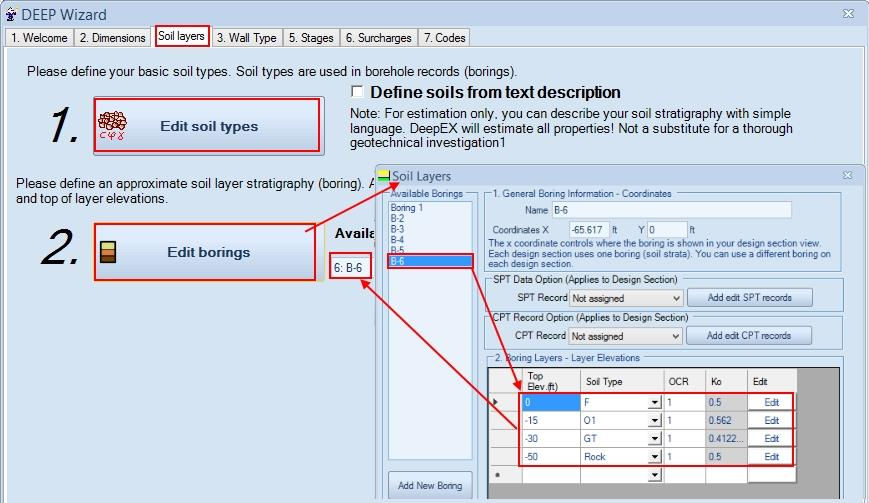
Step 4: Define Soil Properties and Stratigraphy
Assign the soil profiles for your project area. Define the soil properties (unit weight, cohesion, friction angle, etc.) and create the stratigraphy layers as needed.
Step 5: Assign Wall Section Properties
Select appropriate wall section properties (typically sheet piles) and assign them to both walls of the bin system.

Step 6: Define Tierod Support Levels
Specify the elevations of the tierod connections between the walls. These are typically installed as the backfill rises.

Model Generation and Final Adjustments
Once the wizard is complete, DeepEX will automatically generate the full construction staging for the bin-type wall system. Finally, graphically draw a strip surcharge load on the ground surface between the two walls. Ensure that the load remains active from the installation stage and onwards to accurately reflect the backfill condition.

Tip: DeepEX allows for further refinements of the model geometry, wall sections, support levels, and loads after the wizard completes.
Let us show you how to reduce your design time by up to 90%!


