

Can I Create an Embankment Using the DeepEX Model Wizard?
- May 19
- 3 min read
DeepEX includes a dedicated Embankment Wizard that allows geotechnical engineers to generate embankment and earth dam models quickly and consistently. By guiding the user through geometry definition, loading, reinforcement, and ground improvement options, the wizard significantly reduces model setup time while maintaining technical rigour.
How does the Embankment Wizard improve productivity?
The Embankment Wizard is designed to reflect common embankment design workflows. Instead of manually defining geometry, loads, and improvement measures element by element, the wizard creates a ready-to-analyse base model in just a few steps. This allows engineers to focus on assessing stability, settlements, and performance rather than spending time on repetitive modelling tasks.
Step-by-step: Creating an embankment using the DeepEX Model Wizard
Step 1 – Access the Embankment Wizard
From the Model Wizard menu, select Embankment Wizard. This option launches a template specifically developed for generating embankments and earth dams, with or without additional features such as flood walls, reinforcement, or ground improvement.

Step 2 – Define basic embankment geometry
In the Embankment Information panel:
define the top (roadway) elevation,
specify the embankment width at the crest, and
define the slope geometry using horizontal and vertical ratios on both sides.
At this stage, the wizard generates the basic embankment shape automatically.

Step 3 – Select embankment material and optional structural elements
Choose the embankment soil type from the available soil definitions. Optional features can also be activated, including:
a retaining or flood wall at the embankment toe, and
other structural elements as required by the project.
This ensures consistency between the embankment fill properties and the rest of the soil model.
Step 4 – Define surcharge loading on the embankment crest
The wizard allows the user to apply different surcharge conditions at the embankment crest, such as:
no surcharge,
strip load, or
train track loading (with the number of tracks defined explicitly).
These options make it straightforward to represent traffic or railway loading without additional manual input.

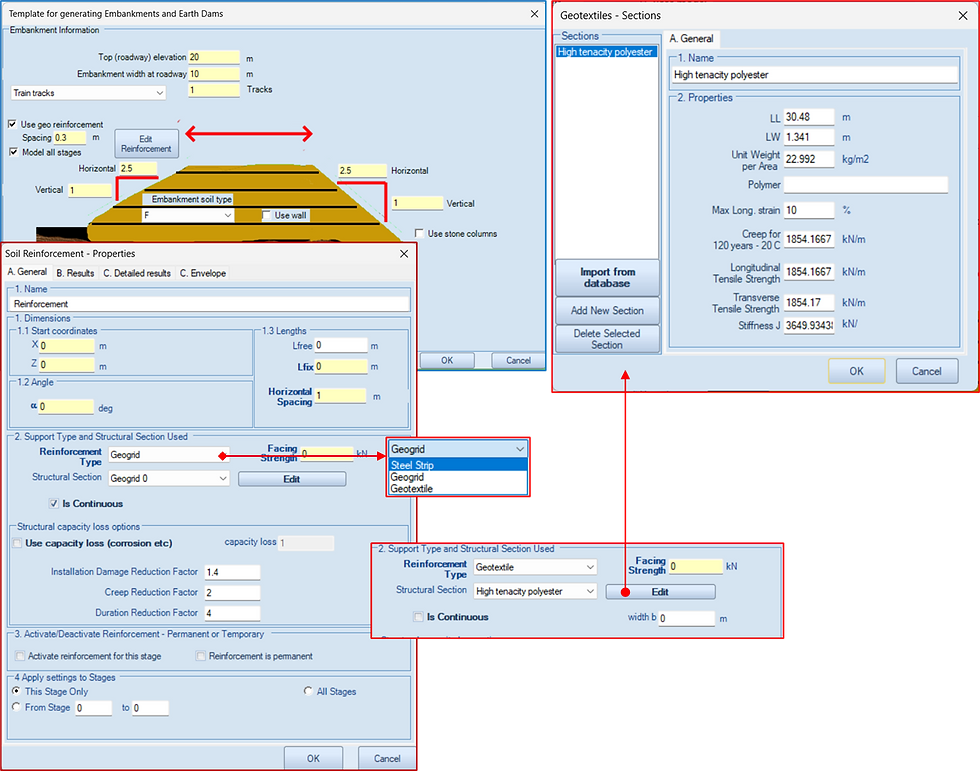
Step 5 – Add geosynthetic reinforcement (optional)
By enabling Use geo reinforcement, the user can:
define reinforcement spacing,
select the reinforcement type (e.g. geogrid, geotextile, steel strip), and
assign mechanical and durability properties from a database or user-defined sections.
Reinforcement can be applied to a single stage or across all stages, supporting both temporary and permanent embankment designs.
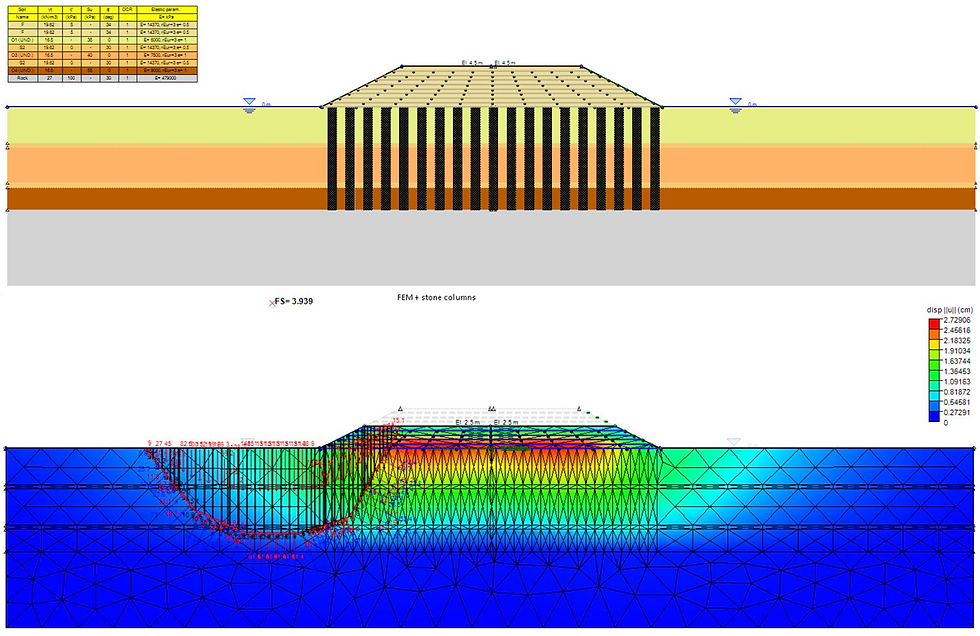
Step 6 – Include ground improvement using stone columns (optional)
The Embankment Wizard also supports stone column ground improvement. When activated, the user can:
define column diameter, spacing, and length,
select the analysis approach (e.g. area replacement or user-defined percentage), and
apply consistent properties across all columns.
This allows rapid evaluation of embankments on soft ground with improvement measures included directly in the model.

Step 7 – Generate the model and proceed with analysis
Once the wizard inputs are confirmed, DeepEX automatically generates the embankment model, which can then be analysed using:
slope stability methods,
settlement and consolidation analysis, and
more advanced numerical approaches if required.
The generated model remains fully editable, allowing further refinement beyond the wizard stage.
Why use the Embankment Wizard instead of manual modelling?
Speed: complex embankment geometries are created in minutes
Consistency: standardised inputs reduce modelling errors
Flexibility: reinforcement, surcharge, and ground improvement are easily included
Scalability: models can be extended from simple checks to advanced analyses
Example
Summary
The DeepEX Embankment Wizard provides a fast and reliable way to create embankment and earth dam models without sacrificing engineering control. By automating geometry creation and integrating loading, reinforcement, and ground improvement options, the wizard boosts productivity and allows engineers to focus on evaluating performance, stability, and design alternatives rather than spending time building models from scratch.
Let us show you how to reduce your design time by up to 90%!


